



根据原帖图文整理,并于2026年11月13日复核 / Based on the original graphics; reviewed 13 November 2026.
中文说明:
SQL Accounting 单据号码设置:如何在单据编号格式中加入月份和年份?
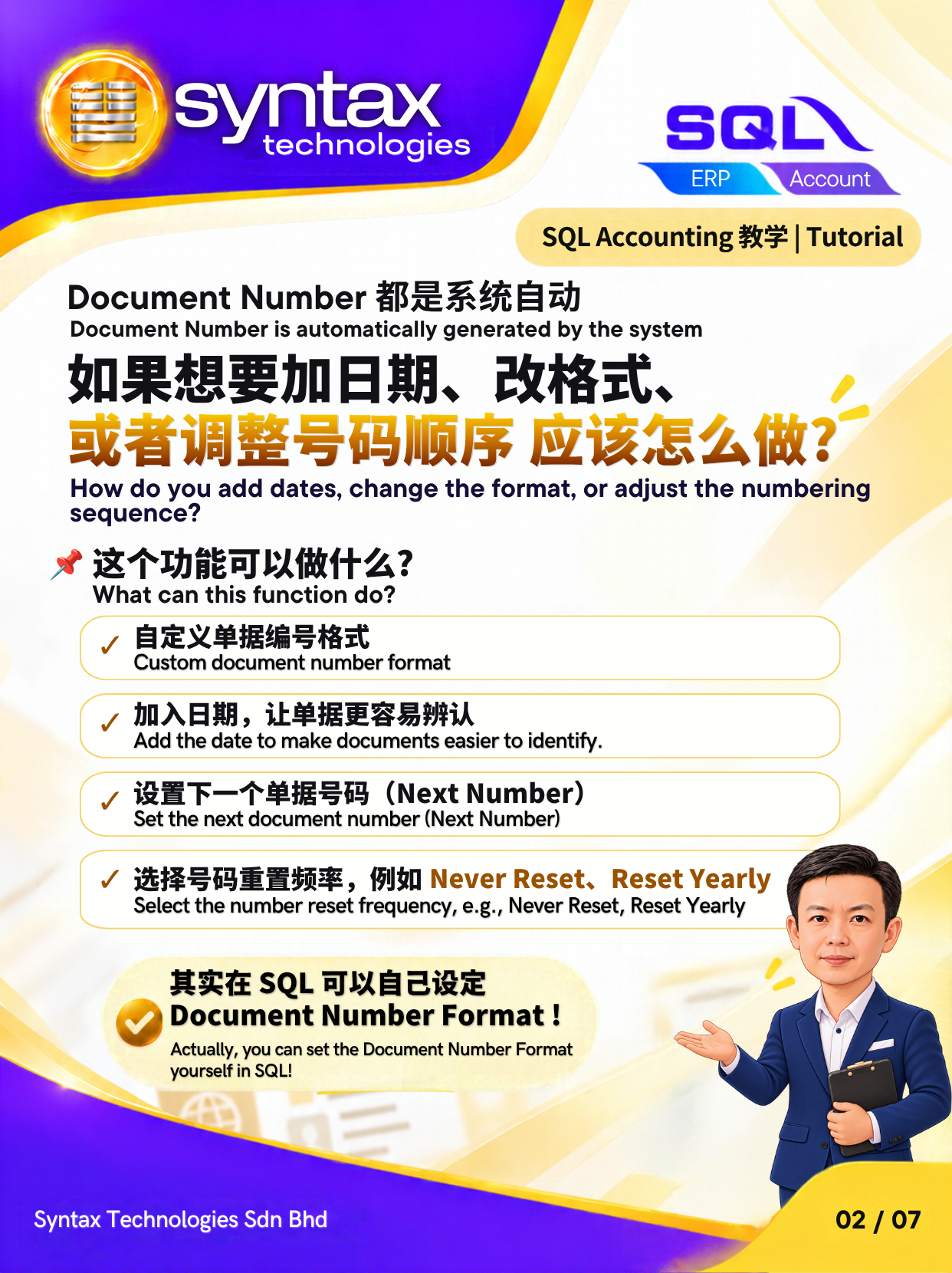
查找 Invoice 时,总要再查看日期,才能确认是哪一个月份的单据?如果单据号码只有流水号,整理不同月份或年份的发票时,往往需要多做一步核对。通过 SQL Accounting 的单据编号格式设置,你可以在编号中加入月份和年份,让单据更容易辨认,日常查找与核对也更直观。
对于需要经常处理发票和整理账目记录的企业来说,清晰的单据号码有助于建立统一的编号习惯。本篇由 Bryan 带你了解如何自定义 SQL Accounting 单据号码、加入月份和年份、选择流水号重置频率,以及设置下一个单据号码。
SQL Accounting 单据编号格式可以包含哪些资料?
SQL Accounting 的单据编号格式可以结合单据前缀、月份、年份和流水号,让企业根据日常管理需要安排编号方式。
例如,单据号码 IV10/2026-00001 中,IV 是单据前缀,10/2026 表示月份与年份,而 00001 则是流水号。这样的发票编号格式,让使用者可以直接从单据号码辨认相关年月,为整理和核对单据提供更清楚的参考。
如何在 SQL Accounting 设置包含年月的单据号码?
你可以通过 Maintain Document Number 调整单据编号格式,并根据公司的使用习惯设置流水号的重置方式。
第一步:进入 Maintain Document Number
在 SQL Accounting 中,前往 Tools → Maintain Document Number,进入单据号码设置页面,调整相关编号设置。
第二步:自定义单据编号格式
根据公司的编号需求,将单据前缀、月份、年份及流水号组合成合适的格式。例如,使用 IV10/2026-00001 这样的编号结构,让 Invoice 号码同时显示年月和流水号。
第三步:选择流水号重置频率
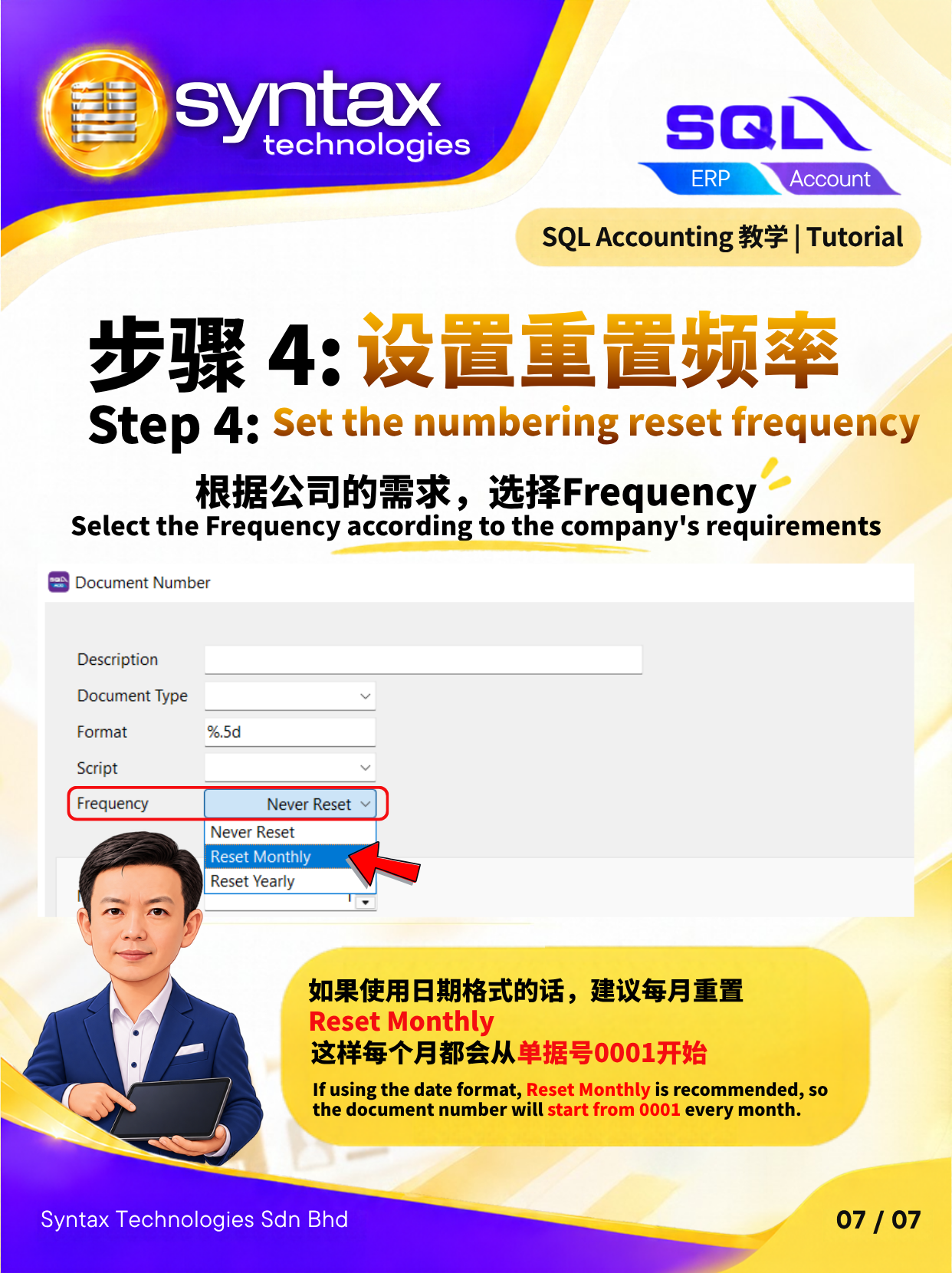
如果希望流水号每个月重新开始,请在 Frequency 选择 Reset Monthly,并配合包含月份和年份的单据编号格式使用。
你也可以根据公司的管理方式,选择按年重置或持续编号。编号格式与重置频率需要配合设置;在号码中加入年月后,仍需选择相应的 Frequency,才能按预期重置流水号。
第四步:设置 Next Number
通过 Next Number 设置下一个单据号码,让后续开单衔接公司的编号安排。设置时,可根据目前使用的编号规则,确认下一张单据应采用的号码。
为什么要在发票编号中加入月份和年份?
在单据号码中显示年月,可以为日常单据管理提供更直接的识别信息。当员工查找某个月份的 Invoice、整理发票记录或核对账目时,便能从编号获得相关年月的参考。
配合统一的单据编号格式与适当的重置频率,也能让团队更容易理解公司的编号规则,使日常单据整理更有条理。
善用 SQL Accounting,让单据管理更清晰
单据号码虽然只是日常开单中的一个细节,却会影响后续查找、整理和核对的便利程度。通过 SQL Accounting 的自定义单据编号格式、Frequency 和 Next Number 设置,企业可以建立更符合自身工作流程的编号方式。
跟着 Bryan 的教学了解相关设置,为公司的 Invoice 编号加入清楚的年月信息。
English:
SQL Accounting Document Number Format: How to Add the Month and Year to Invoice Numbers
Do you need to check the document date whenever you want to identify which month an invoice belongs to? When invoice numbers contain only a running number, organising records across different months or years can require an extra check. SQL Accounting lets you include the month and year in your document number format, making invoices easier to identify, find and review.
A clear numbering structure also helps your team follow a consistent approach to document management. In this tutorial, Bryan explains how to customise SQL Accounting document numbers, include the month and year, choose a running number reset frequency, and set the next document number.
What Can You Include in a SQL Accounting Document Number?
A SQL Accounting document number format can combine a document prefix, month, year and running number to suit your company’s numbering requirements.
For example, in IV10/2026-00001, IV is the document prefix, 10/2026 represents the month and year, and 00001 is the running number. This invoice numbering format makes the month and year visible within the document number, providing a useful reference when organising and checking records.
How to Set Up Document Numbers with the Month and Year in SQL Accounting
Use Maintain Document Number to customise your numbering format and choose how the running number resets.
Step 1: Open Maintain Document Number
In SQL Accounting, go to Tools → Maintain Document Number to access the document numbering settings.
Step 2: Customise the Document Number Format
Combine the document prefix, month, year and running number according to your company’s preferred structure. A format such as IV10/2026-00001 displays the month and year alongside the running number.
Step 3: Choose the Running Number Reset Frequency
To restart the running number each month, select Reset Monthly under Frequency and use a document number format that includes the month and year.
You can also choose yearly resets or continuous numbering to suit your company’s process. Adding the month and year to the format is one part of the setup; the Frequency setting determines how the running number resets.
Step 4: Set the Next Number
Use Next Number to set the next document number according to your company’s numbering arrangement. Check the intended next number against your existing numbering rules before continuing with document entry.
Why Include the Month and Year in Invoice Numbers?
Including the month and year gives your team an additional reference when identifying invoices, organising monthly records and checking accounting documents.
Together with a consistent document number format and a suitable reset frequency, this helps employees understand the numbering structure and keep everyday document management organised.
Make Document Management Clearer with SQL Accounting
Document numbering is a small part of invoice preparation that can make a practical difference when finding and reviewing records later. SQL Accounting’s document number format, Frequency and Next Number settings help you create a numbering structure that fits your workflow.
Follow Bryan’s tutorial to learn how to configure these settings.
想了解更多 SQL Payroll、SQL Payroll Cloud 及 SQL Accounting Software 的实用教学?欢迎关注 Syntax Technologies,获取更多适合马来西亚企业的 HR 与会计软件操作指南。
如需 SQL Payroll 设置协助或软件咨询,欢迎联系 Syntax Technologies Sdn Bhd。
Looking for more practical tutorials on SQL Payroll, SQL Payroll Cloud and SQL Accounting Software? Follow Syntax Technologies for more HR and accounting software guides tailored to Malaysian businesses.
For assistance with SQL Payroll setup or software enquiries, please contact Syntax Technologies Sdn Bhd.
原帖图解 / Original graphics

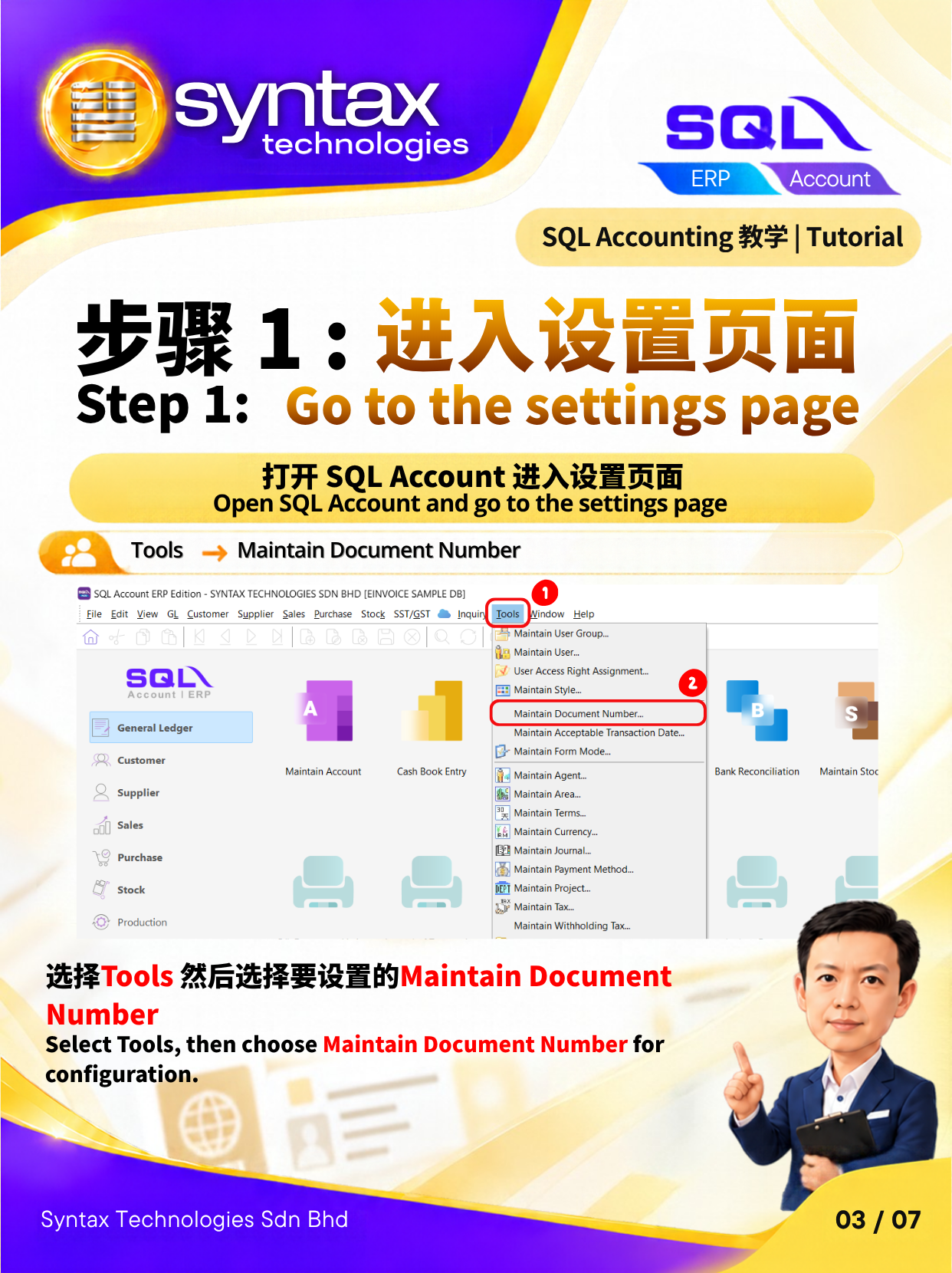
步骤 1:打开 SQL Account 进入设置页面/Step 1: Open SQL Account and go to the settings page
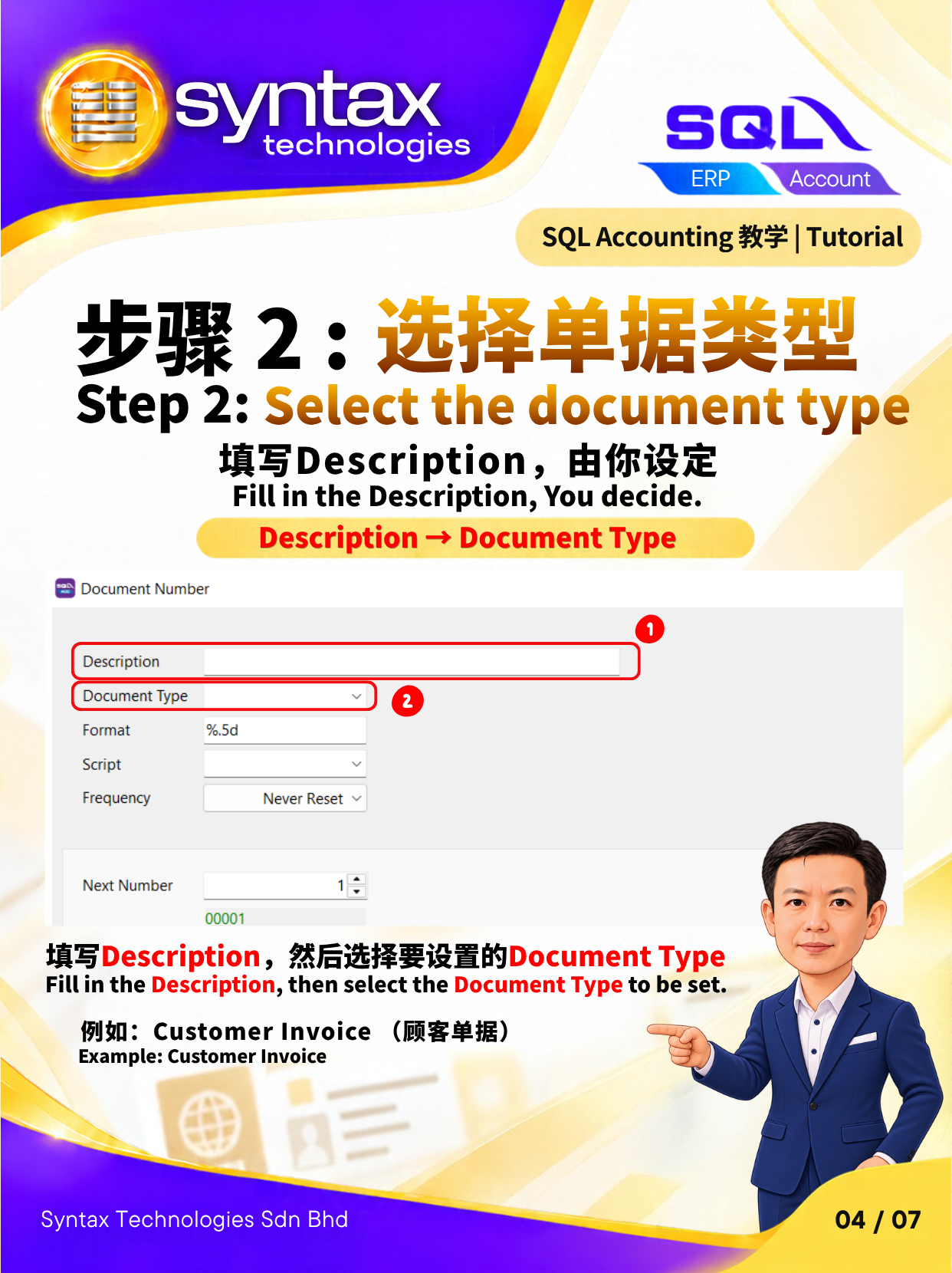
步骤 2 : 填写Description,由你设定/Step 2: Fill in the Description, You decide.
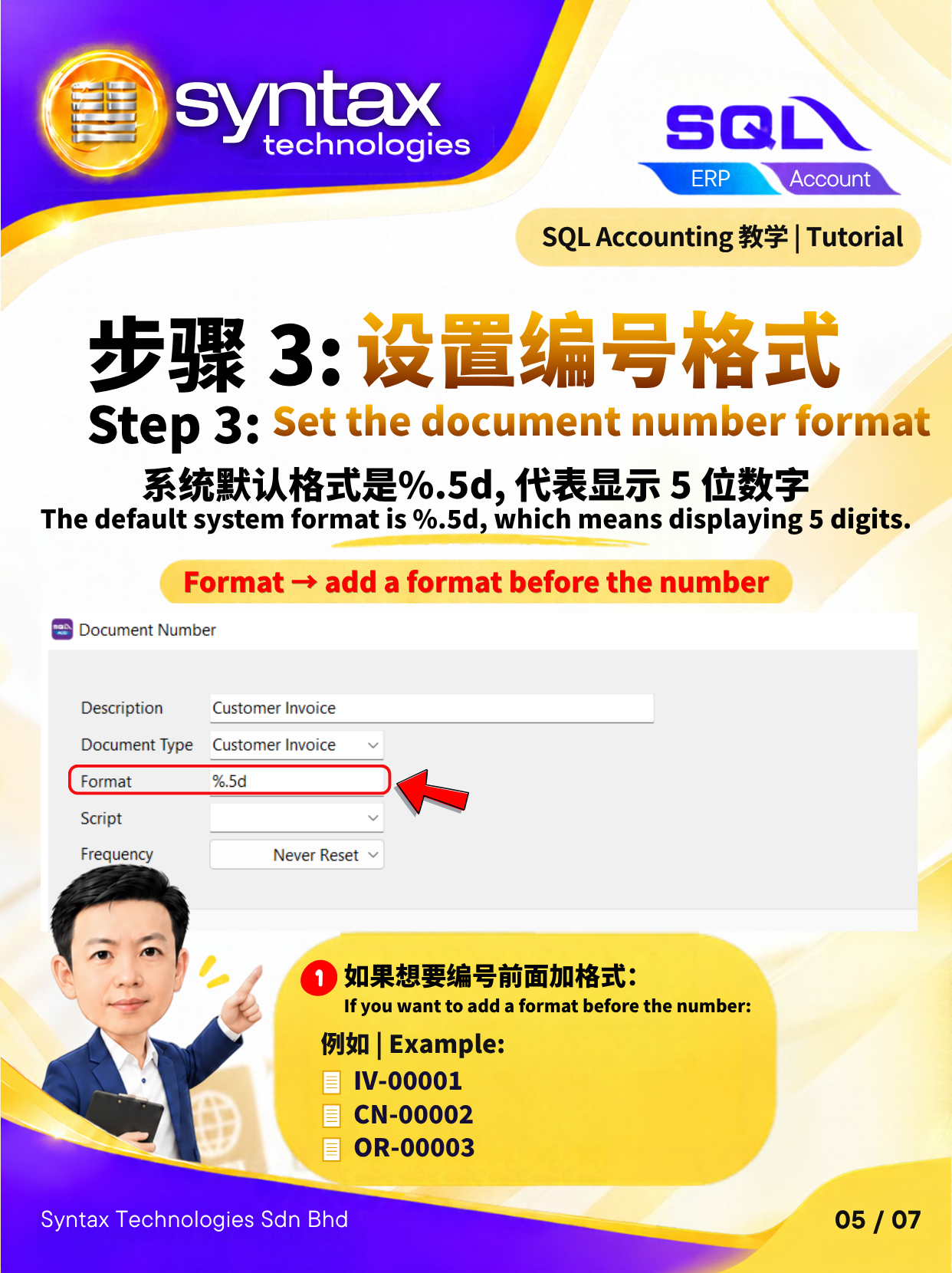
步骤 3: 如果想要编号前面加格式/Step 3: If you want to add a format before the number
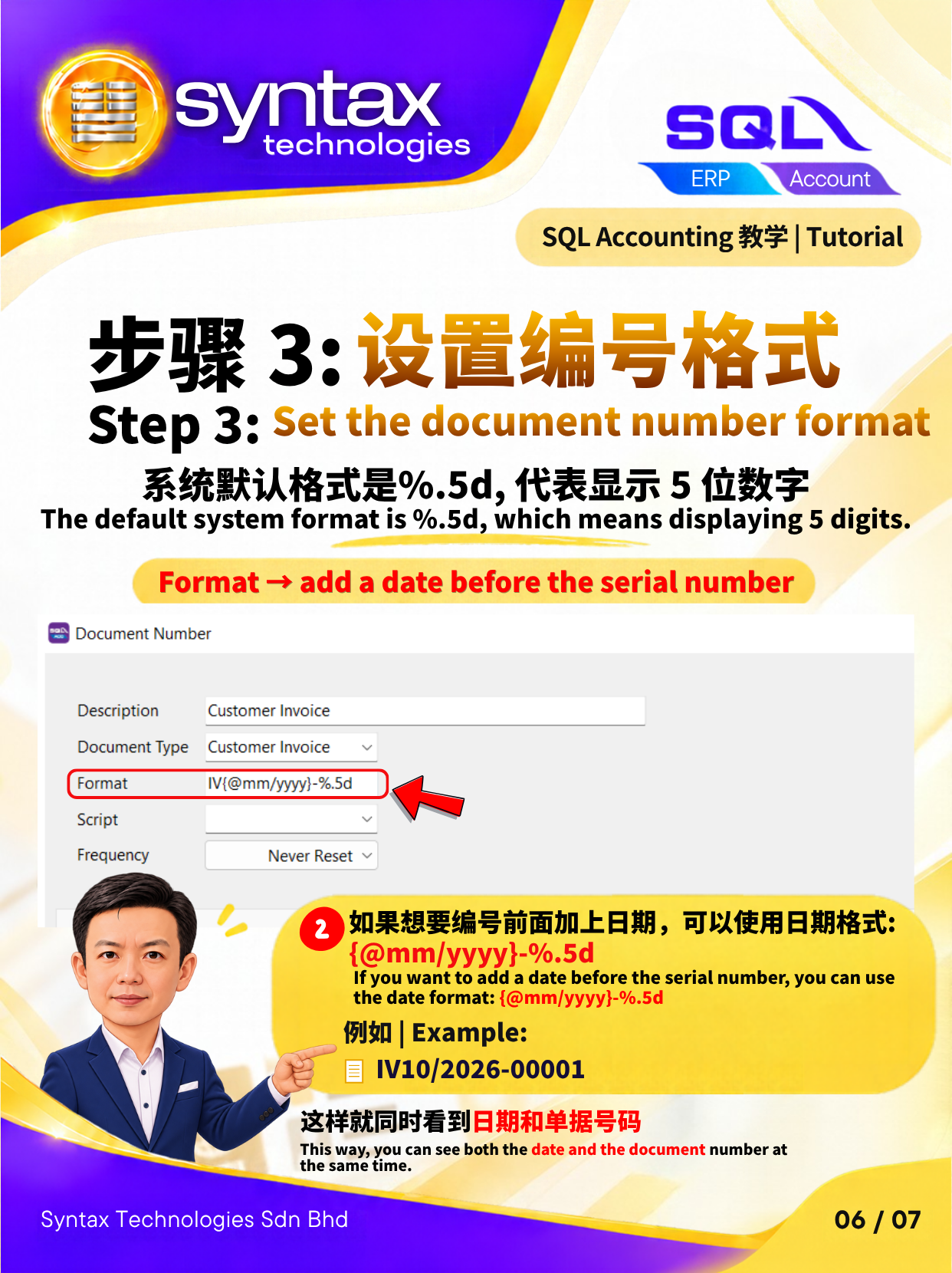
步骤 3: 如果想要编号前面加上日期,可以使用日期格式{@mm/yyyy}-%.5d/Step 3: If you want to add a date before the serial number, you can use the date format: {@mm/yyyy}-%.5d

联系 Syntax / Contact Syntax
需要 SQL Accounting 或 SQL Payroll 操作、培训或技术支持?联系 Syntax Technologies,说明您的业务需求。For SQL Accounting or SQL Payroll sales, training and technical support, contact our team with your requirements.